Overview
Photographers generally have to manually calculate costs, create Excel spreadsheets or PDFs listing all services, break down costs, estimate durations, and track additional charges — all by hand. They need multiple copies to track payments, and losing a quote means guessing what was agreed upon. GetUrSnap digitizes the entire quote creation process, making it professional, trackable, and payment-ready.
The Problem
The traditional quoting process is a mess: manually writing down services in a notebook, creating ad-hoc Excel sheets, or using generic PDF templates. There's no standardized format, no easy way to share with clients, and no tracking. When a client calls months later about a remaining payment, you're digging through WhatsApp chats and paper files trying to remember what was agreed upon. Worse, the lack of professionalism in manual quotes often leads to photographers settling for less money.
The Solution
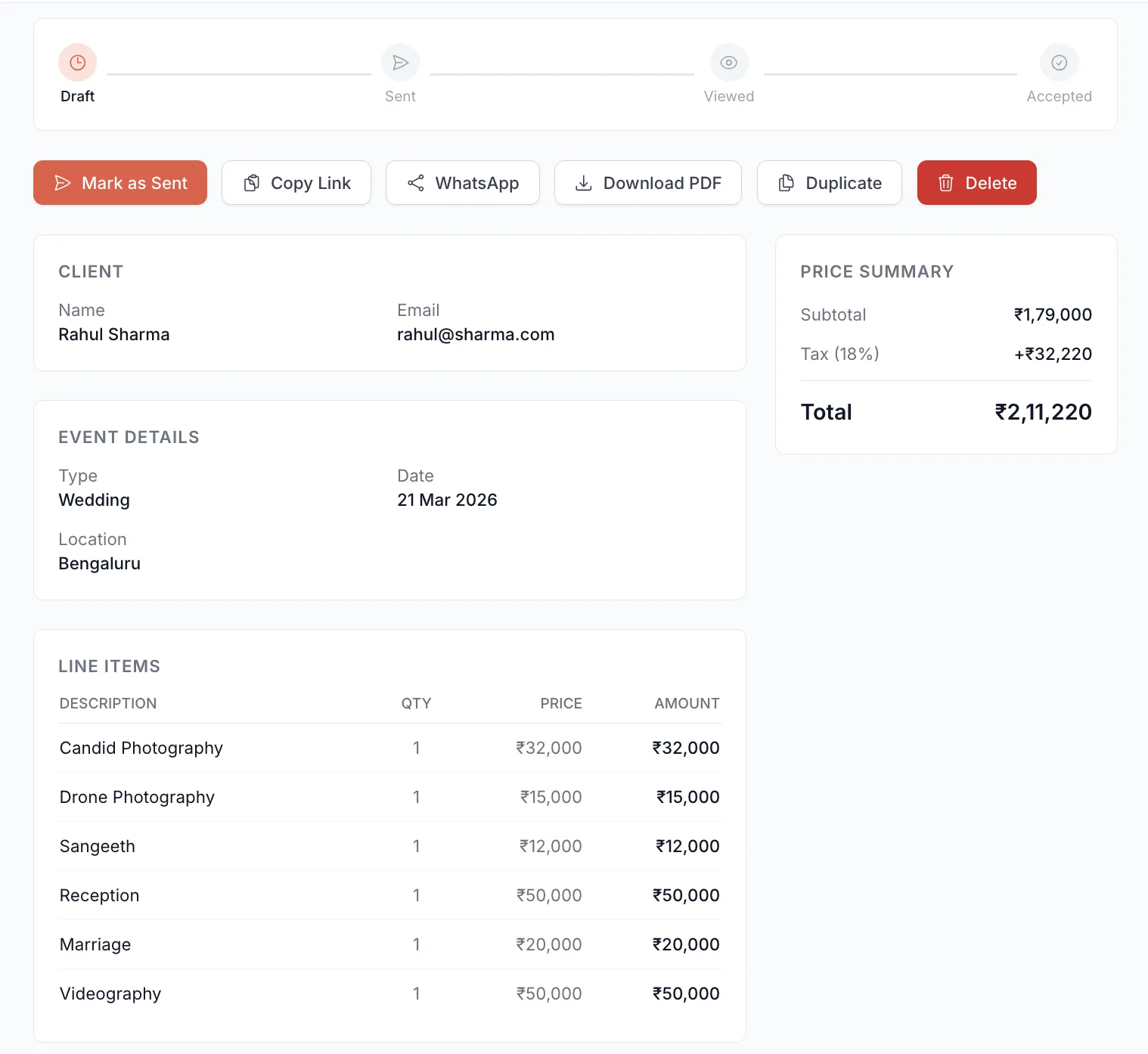
GetUrSnap provides a complete digital quoting system. Capture every detail — client name, event venue, date, negotiation notes, terms and conditions, line items with quantity and price. The system calculates totals automatically and generates a professional digital quote that can be printed, downloaded as PDF, or shared with your client via email with a unique link. Clients can view and accept quotes online, and payments are collected instantly through Razorpay integration. Every quote stays in your system for as long as you need it — no more lost records.
Key Benefits
Professional digital quotes
Detailed line items, descriptions, quantities, and pricing — all formatted professionally with your branding.
One-link sharing
Share quotes via a unique link. Clients can view, review, and accept online — no downloads or apps needed.
Integrated payments
Collect payments instantly through Razorpay. Clients can pay right from the quote page — no switching to another app.
Full lifecycle tracking
Track every quote from draft to sent, viewed, accepted, and paid. See open rates and conversion analytics.
How to Use
Follow these steps to get started with Quotes & Payments in your GetUrSnap dashboard.
Create a new quote
From the Quotes section, click "New Quote." Enter the client name, event details, venue, and date.
Add line items
Add services as line items — e.g., "Full Day Coverage: ₹25,000," "Photo Album (100 pages): ₹8,000." Add quantities and descriptions.
Add terms & notes
Include negotiation notes, terms and conditions, payment terms, and any additional details your client needs.
Share with client
Click "Share" to send the quote to your client via email. They receive a link where they can view the detailed breakdown.
Collect payment
When the client accepts, they can pay directly through the integrated Razorpay gateway. You get notified instantly when payment is received.
Deep Dive
Why digital quotes close more deals
A handwritten quote on a notepad says "amateur." A professionally formatted digital quote with clear line items, terms, and an online payment option says "I run a serious business." Clients are more likely to accept and pay promptly when the process is professional and frictionless. GetUrSnap's quote analytics show that photographers using digital quotes have significantly higher conversion rates compared to manual quoting methods.
Never lose a record again
Every quote you create is stored permanently in your GetUrSnap account. You can search by client name, date, or event — and pull up the exact terms that were agreed upon years ago. This is invaluable for handling payment disputes, understanding your pricing history, and planning your business finances. No more relying on WhatsApp chats or paper notebooks that have a 99% chance of getting lost when you need them most.
Pro Tips
Create template quotes for your most common packages (e.g., "Half Day Wedding Package"). Clone and customize for each new client.
Enable the Razorpay payment link on every quote. The easier you make it to pay, the faster you get paid.
Check your quote analytics regularly. If your acceptance rate is low, it might be time to adjust your pricing or package structure.